Guide
The daily notification
Updated
Steps
Open the app and read the passage of the day, then swipe to the previous one. After that second reading a card asks “A thought each morning?”. Tap Enable and accept the system prompt; tapping Later dismisses the card for good, and Settings is then the only path.
Otherwise, tap the gear at the top of the passage screen to open Settings and switch on Daily notification. The system prompt appears once, here, and never at launch.
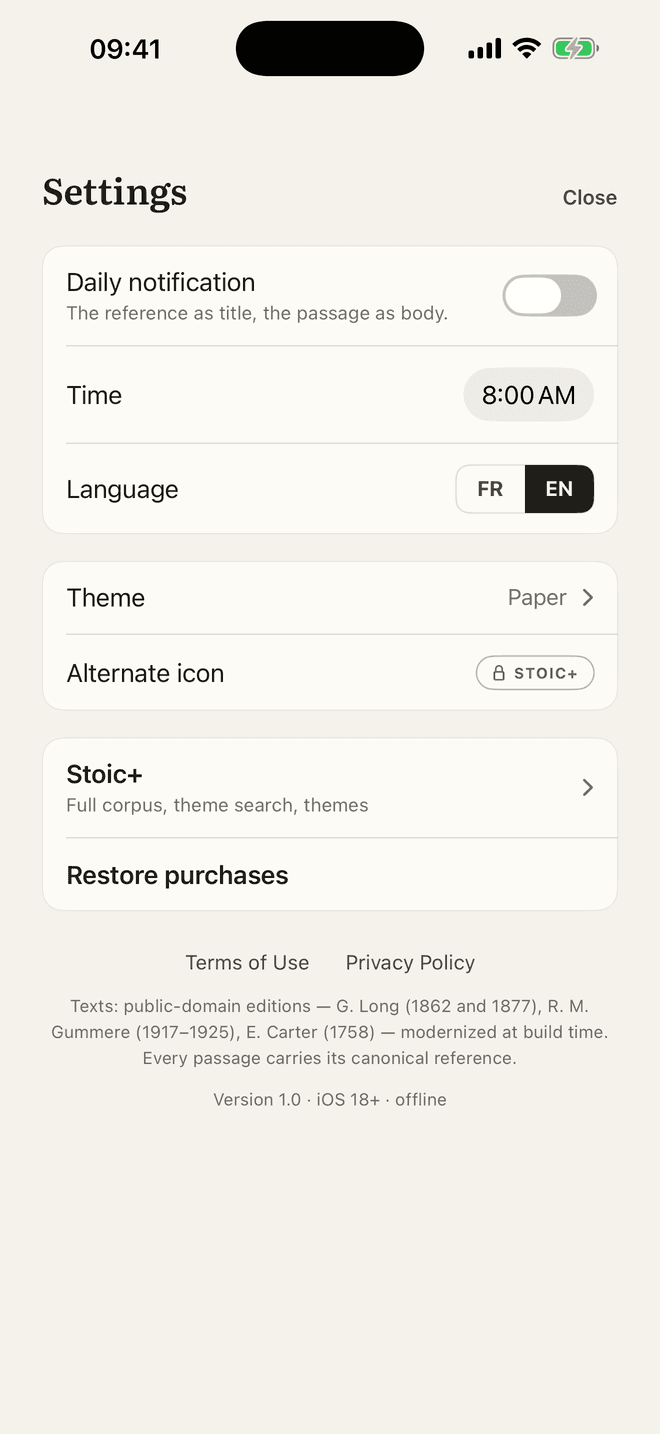
Set the Time in the row below; by default it is in the morning, and the row shows the time that is set. The next days are then scheduled on the iPhone itself, and topped up each time the app comes to the foreground.
The title of the notification is the canonical reference; the body is the whole passage when it fits, otherwise its first complete sentence — never a cut in the middle of a clause, never an ellipsis. Tapping it opens the app.
Changing the language in Settings reschedules the notification in that language. It is local: computed on the device from the embedded corpus, with no push server, and it names the same passage as the app for that day.
If nothing arrives, check three things in order: the switch in the app’s Settings; iOS Settings › Notifications › Stoïque, where notifications must be allowed; and any Focus mode or scheduled summary holding delivery. A refusal in the system prompt is never asked again — the app sends you to the system pane instead. More on the Support page.
What Stoïque does not do
- No audio: the notification carries text, not a recording.
- No journal and no guided meditation.
- No Android version.
- No statistics screen.
- No side-by-side translation comparison.
Free and Stoic+
The daily notification is free and has no quota. Free, it draws on the passages of Marcus Aurelius; with Stoic+ it draws on the whole corpus, Seneca and Epictetus included.
For anything this guide does not cover, see the Support page.
The next step is on the iPhone: install Stoïque, then follow the steps above.